> ## Documentation Index
> Fetch the complete documentation index at: https://docs.labellerr.com/llms.txt
> Use this file to discover all available pages before exploring further.
# Audio Segmentation
> Learn about audio segmentation in Labellerr, a feature that divides audio signals into segments and classifies them for various applications like speech recognition or music.
Audio segmentation divides the digital audio signal into a sequence of segments or frames and then classifies these into various classes such as speech recognition, music, or noise.
The template configuration setup is located in the 'Label Configuration' section on the project creation page.
[How to Create an Audio Annotation Project?](/getting-started/create-audio-project)
Set object type to ‘Audio segmentation’and add attributes to write the transcription in the input box.
Select the portion of the audio that needs transcription. This selection will generate a parallel attribute section on the right side.
Similarly, select objects and add transcriptions alongside the corresponding attributes in the attributes section.
Similar screens are available in the review stage, where reviewers can also edit transcriptions as needed.
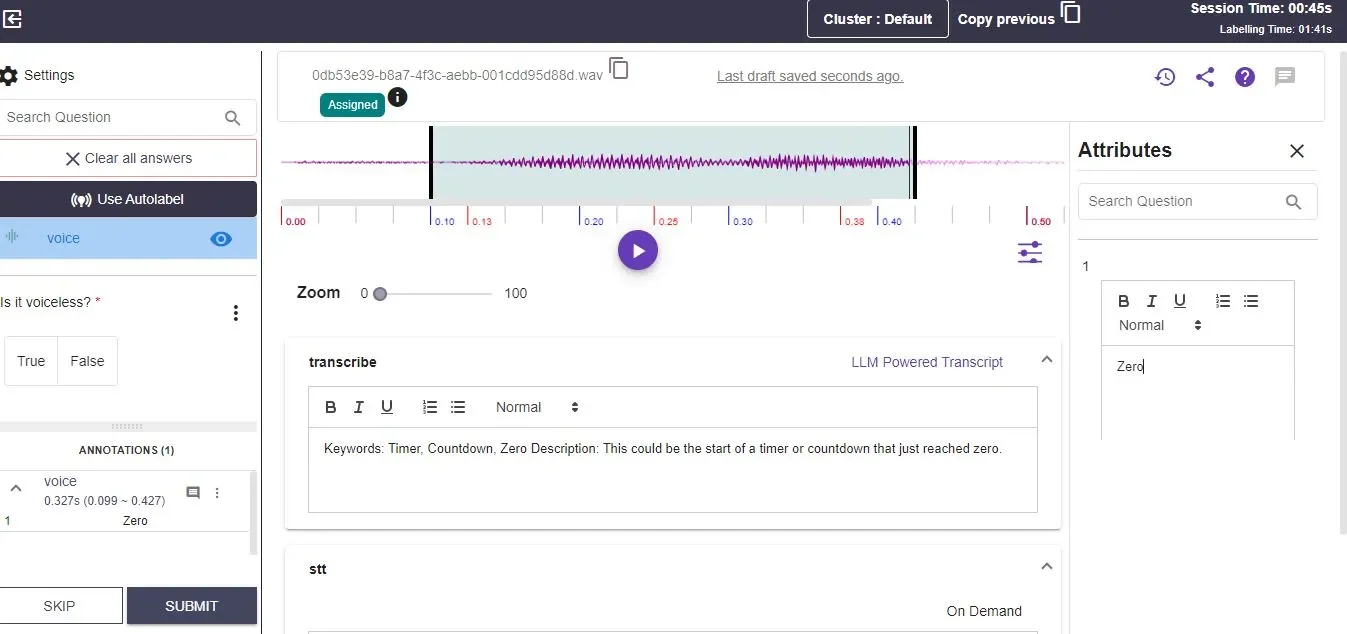 Similarly, select objects and add transcriptions alongside the corresponding attributes in the attributes section.