

Labellerr Workflow Diagram
We’ve designed a structured, multi-stage workflow that helps your team label, review, and approve data to guarantee accuracy before exporting.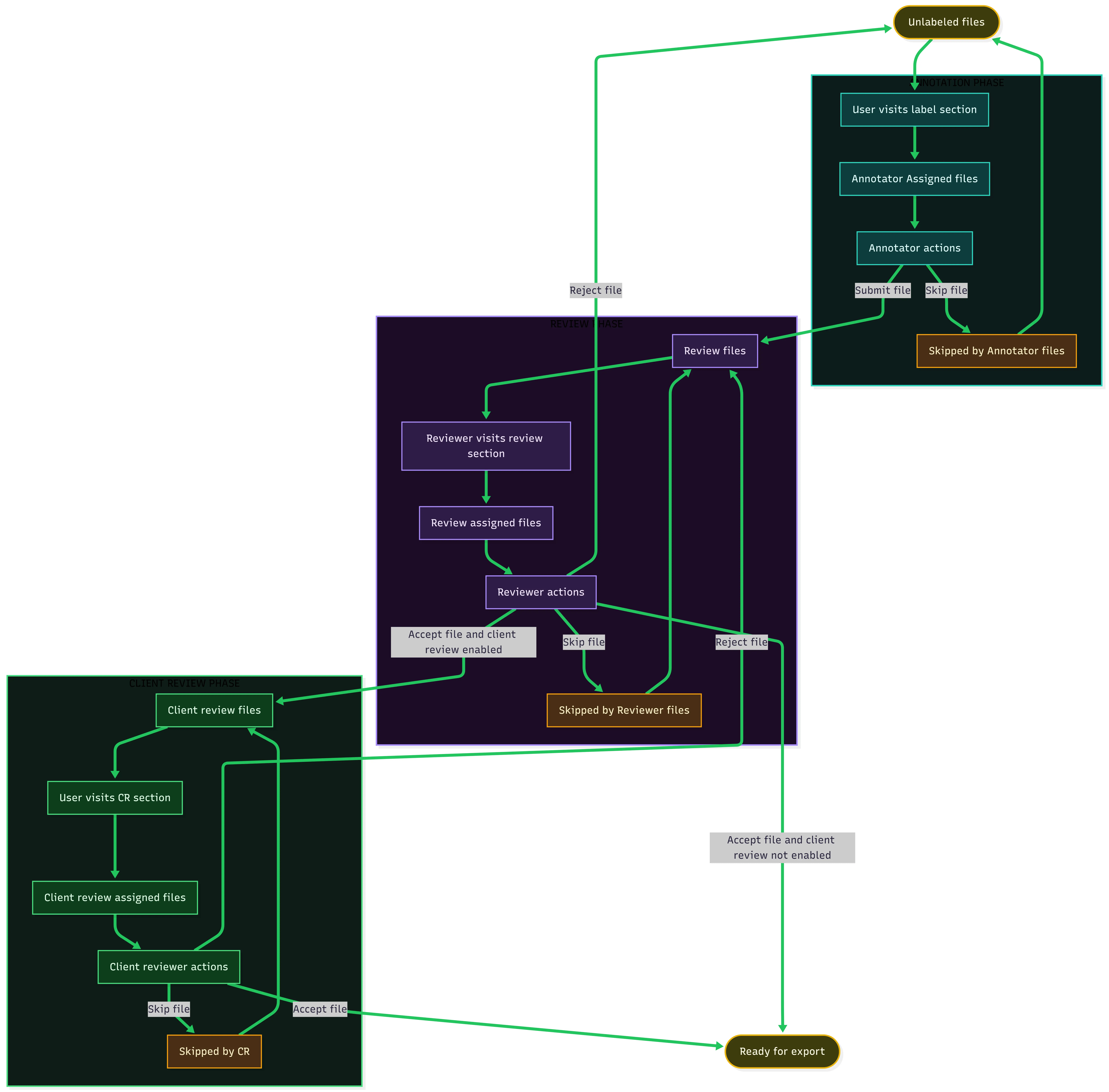
Workflow Breakdown
The Labellerr lifecycle consists of three structured review phases leading to export readiness:1. Annotation Phase
The primary stage where raw data is labeled by assigned annotators.- Unlabeled Files: Freshly ingested files enter the pipeline ready for annotation.
- User Visits Label Section: Annotators access their assigned tasks in the Label tab.
- Annotator Assigned Files: Files are allocated to annotators based on project assignments or batch distribution.
- Annotator Actions:
- Submit File: Annotations are completed and submitted, moving the file forward into the Review Phase.
- Skip File: If an asset is corrupted, unclear, or out-of-scope, annotators can skip it, moving it to Skipped by Annotator Files.
2. Review Phase
Internal quality assurance where designated reviewers validate and audit annotator submissions.- Review Files Queue: Holds all submitted files awaiting inspection.
- Reviewer Visits Review Section: Reviewers navigate to the Review tab to inspect completed annotations.
- Review Assigned Files: Reviewers evaluate labels against annotation guidelines.
- Reviewer Actions:
- Accept File:
- If Client Review is NOT enabled, the file transitions directly to Ready for Export.
- If Client Review IS enabled, the file advances to the Client Review Phase.
- Reject File: File is rejected and sent back to Unlabeled Files (or re-assigned to annotators) with remarks for correction.
- Skip File: File is set aside in Skipped by Reviewer Files and can be re-queued into Review Files if needed.
- Accept File:
3. Client Review Phase (CR)
An optional external or client-level audit layer for final customer sign-off.- Client Review Files: Files approved by internal reviewers enter this queue.
- User Visits CR Section: External reviewers or client managers access the Client Review section.
- Client Review Assigned Files: Client auditors evaluate annotations against enterprise quality standards.
- Client Reviewer Actions:
- Accept File: File is fully approved and marked as Ready for Export.
- Reject File: Sent back with file-level feedback to internal Review Files for rework.
- Skip File: Placed into Skipped by CR and can return to the client review queue.
4. Ready for Export
Once files pass all active review gates (internal review and optional client review), they are placed into the Ready for Export state. These finalized datasets can then be exported in formats such as JSON, COCO JSON, CSV, or synced directly back to your cloud storage (e.g., AWS S3 / GCS).For further assistance contact support@tensormatics.com